The Overview tab of the Web Widget inspector lists what can go wrong with the widget on a website, from refused zE commands to contrast and sign-in.
Plan requirement
| App |
pluscloud AI Agent Preview |
| Subscription |
Suite Team or higher, Support Team or higher |
The Overview tab of the Web Widget inspector lists what can go wrong with the widget on a website, from refused zE commands to contrast and sign-in. This is every check and what it means.
Reading the checks
The checks are under Checks on the Overview tab, and the count is on the minimised inspector. No problems found. means none applies. Each check has a level: red is an error the widget acts on, orange is a warning, blue is information. Many show the call or value they are about in a code line. Some have a button: Reload page, Show in the Lab, Stop test, Show the widget again or Remove preview.
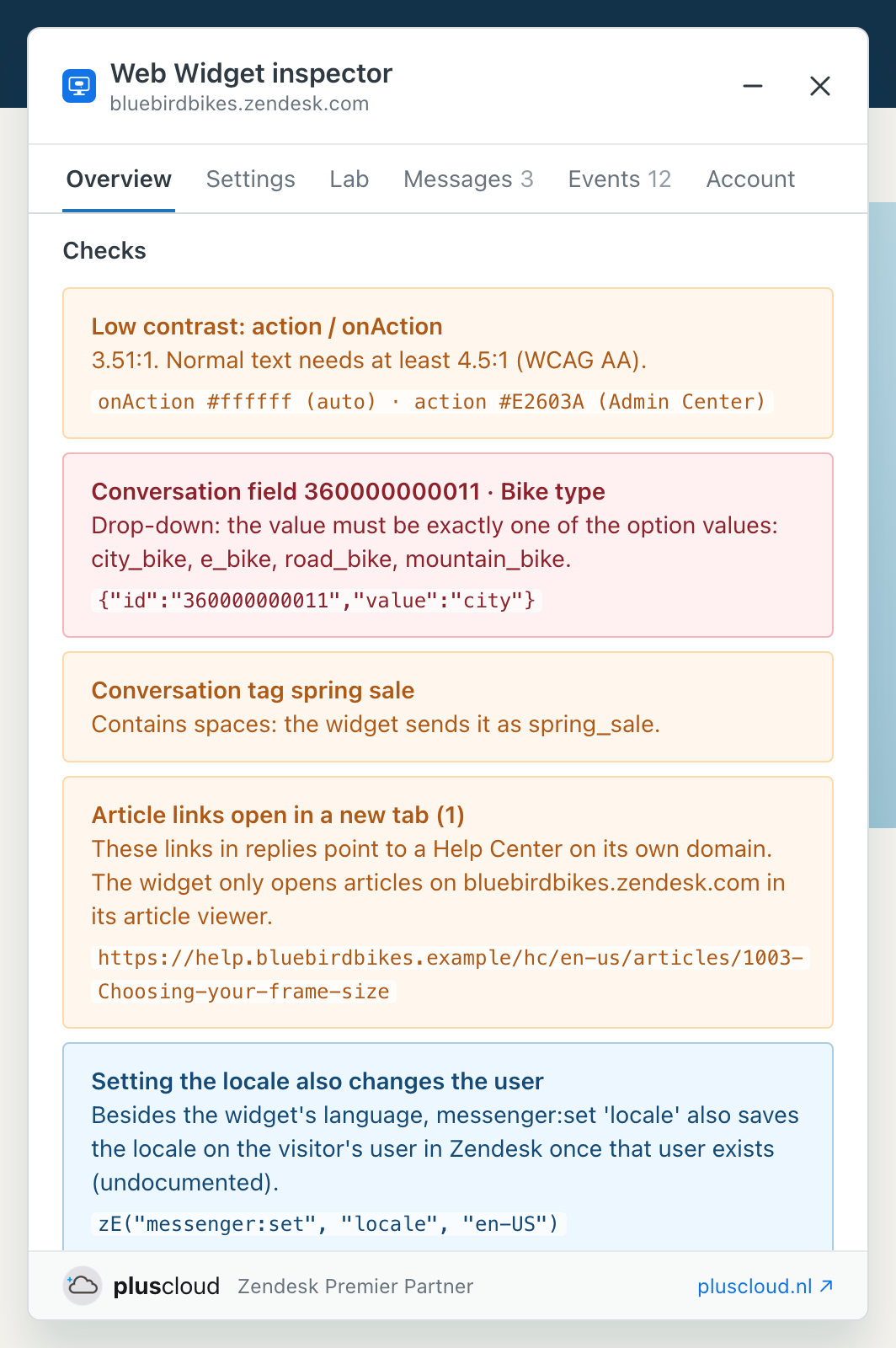
The checks come from the widget's own rules as the inspector reads them in the widget's code (build fdbc813, October 2026). How you switch the inspector on is in Getting started with the Web Widget inspector.
The widget on the page
| Check |
What it means |
| No Zendesk snippet found |
The page has no ze-snippet script, or loads the widget another way. The inspector keeps looking for half a minute. |
| Widget configuration not available |
The widget's public configuration could not be loaded for the key in the snippet. |
| Not a messaging Web Widget |
The key belongs to the Web Widget (Classic), which the inspector does not support. |
| Zendesk snippets on this page |
The snippet loads more than once, which can load the wrong brand or a second widget. |
| The widget isn't showing |
No launcher or messaging window, and the site did not hide it with zE. |
| Something covers the launcher |
An element of the site lies on top of the launcher. The code line names it. |
| Widget language differs from the page |
The site sets a locale with zE that differs from the page's language. |
| This domain isn't allowed |
For admins: the brand only allows listed domains in Admin Center, and this one is not on the list. |
zE commands and the widget's messages
| Check |
What it means |
| The widget refused a zE command |
The command does not exist in this widget, with the error and the call. |
| Error from the widget, Warning from the widget |
What the widget wrote to the console. |
| Customization the widget won't apply |
A value in the site's customization the widget refuses. An invalid colour makes it ignore the whole call. |
| Old form of a zE call, Classic widget command |
zE({…}) and webWidget commands belong to the Classic widget. The messaging widget throws an error and does nothing. |
| There's no ready event |
messenger:on 'ready' does not exist, although Zendesk's guide for embedded mode mentions one. Use zE(function () { … }). |
| updateUser: calls, only the last one is sent |
Calls within 500 ms replace each other instead of being merged. Put all fields in one call. |
| Setting the locale also changes the user |
Information: the locale is also saved on the visitor's user in Zendesk once that user exists. |
| newConversation doesn't open the widget, navigation doesn't open the widget |
Call zE('messenger', 'open') as well. |
| navigation can create a user and a conversation |
Navigating to the conversation list creates them in Zendesk, also for visitors who never write. |
| unreadMessages fires right away and can't be unsubscribed |
The callback runs at once with the current count, and there is no function to stop listening. |
| fetchConversations also works with one conversation |
Information: use zE('messenger:get', 'config') to tell the two modes apart. |
Colours, fields, tags and sign-in
| Check |
What it means |
| Low contrast |
A text and background pair of the widget below 4.5:1, the WCAG AA level for normal text. Below 3:1 it is an error. The code line says where each colour comes from: Admin Center, the site, the Lab or the default. |
| Conversation field |
A value the site sets with conversationFields that the widget ignores: an unknown ID, a system or inactive field, a field customers cannot edit, or a value that does not fit the field type. |
| Conversation fields not checked |
Sign in to the account as an agent or admin to check the field IDs and values. |
| Conversation tag |
A tag from conversationTags the widget changes or leaves out: spaces become underscores, tags with special characters or over 255 characters are left out, and only the first 20 tags are kept. |
| Login (JWT) |
Problems with the token the site passes to loginUser: no JWT within 4 seconds, a failed login, a missing kid or external_id, a scope other than user, an algorithm other than HS256, an expired token or one that expires within 5 minutes. |
| Cookies switched off |
The site sets the messenger cookies to none: the widget is hidden or cannot keep the conversation. |
| Conversations are forgotten |
Information: conversation history is set to forget, so a new browser session starts a new conversation. |
| Article links open in a new tab |
Links to Help Center articles in replies that the widget does not open in its article viewer: a Help Center on its own domain, a link without a locale, or an article that needs sign-in. |
| Article viewer off |
The account does not have the widget's article viewer. |
How the inspector checks fields, tags and the login token is in The Settings and Account tabs of the Web Widget inspector.
Accessibility
| Check |
What it means |
| Widget hidden from screen readers |
An element around the widget has aria-hidden or inert, often left by a modal or cookie banner. |
| Launcher can't be reached with the keyboard |
The launcher button has tabindex="-1" or is disabled. |
| Launcher without a name for screen readers |
The launcher button has no label, so a screen reader only says "button". |
| Launcher frame without a title |
The launcher's frame has no title attribute. |
Changes and the inspector itself
| Check |
What it means |
| New widget build, Feature flags changed |
Zendesk updated the widget, or the account's widget flags, since this browser last saw this account. Check that the site's setup still works. |
| Capture started late |
The inspector started after the page loaded. Reload to see everything from the start. |
| AI agent not visible to you |
Sign in to the account or its AI agents dashboard to see the AI agent and the conversation log. |
| Lab is on, Lab setting the widget won't apply |
You see the widget with your Lab customisation, and a value in it that the widget refuses. |
| Embedded-mode test, Zendesk debug switches are on, The lab skips the widget on this page, Proactive message preview is on |
A test from the Lab is running in this browser. See The Lab in the Web Widget inspector and Experimental and undocumented Web Widget features. |
| This page skips the widget |
The site sets window.zESkipWebWidget, so the widget does not start on this page. |
See also
Comments
0 comments
Please sign in to leave a comment.